|
Tested 100% with all common HDMI sources such as HDPVR, Apple TV Player, Mvix (HDMI Version), Sony Playstation 3, Microsoft Xbox 360, DVD players and Blu-ray Players on the SA market.
HDMI devices (any source / player, LCD, Plasma etc) have different results when inserting HDMI Repeater devices depending on the equipment you are using (a repeater device is any switch / splitter / extender etc). Please ensure to get confirmation from the manufacturer of your source / player / LCD that the specific player or LCD can communicate via a HDMI Repeater. Some source devices might not allow any HDMI device between itself and the LCD and will only function via a direct HDMI cable to the LCD. The opposite is also possible where the LCD needs a direct connection to the source / player and will not accept a regenerated signal from a HDMI Repeater device. Your display or source manufacturer can confirm if their product supports the functions required.
Benefits from using this HDMI Extender / Balun :
1. CAT-6 / CAT-7 cabling can fit into smaller areas than HDMI because of the head size of the cable.
2. Transmission distance can be up to 60 meters (1080P) and 100 meters (720p). When using normal HDMI cables opposed to using this extender, cables must be customized when the length is over 15 meters.
Features :
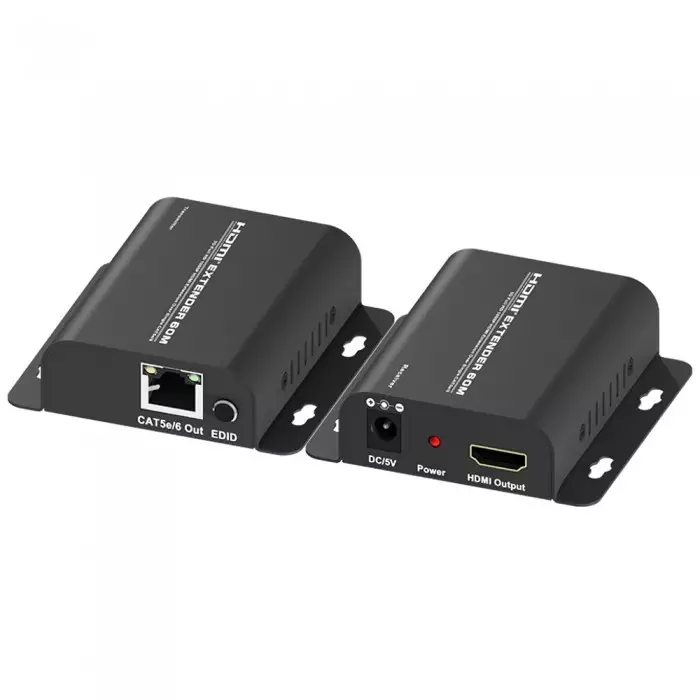
● One Sender & One Receiver module, no configuration needed.
● Use CAT6 / CAT6e / CAT7 cable to substitute HDMI cable to achieve long distance transmissions.
● Follow the standard of IEEE-568B when installing and terminating UTP / STP Cables to ensure minimum signal loss over longer distances.
● Transmission distance reaches up to 60 meters (1080P) and 100 meter 1080i / 720p.
● Auto-adjustment of feedback, equalization and amplify, the user does not need to care about the length of the cable.
● Compact size.
● Signaling rates up to 2.25Gbits in support of 1080P display.
● HDCP 1.2 compliant.
● If you have no video or video and no audio and you have installed a HDMI Extender over CAT5e / CAT6 / CAT7 please check the 2-pairs of cables between transmitter and receiver to ensure it is correctly terminated according to UTP/STP Standard 568B (Picture below)
This item is supplied without packaging / boxing directly from the factory to reduce costs to the public. You will not find another quality HDMI product such as this at a better price.
Specifications :
● Model HDMICAT60TX&RX
Signal Inputs/Output
● Input Video Signal : 0.5 -1.0 volts p-p
● Input DDC Signal : 5 volts p-p (TTL)
● Maximum Single Link Range : 1920X1200, 1080P
● Output Video : HDMI 1.3
● Video format supported : DTV/HDTV, 1080P /1080i / 720P / 576P / 480P / 576i / 480i
Transmission distance
● Using STP CAT-6e / CAT-7 Cable : 60M for 1080p
● Using STP CAT-6e / CAT-7 Cable : 100M for 720p
Resolutions(HDTV)
● Interlaced(50&60Hz) : 480i,576i,1080i
● Progressive(50&60Hz) : 480p,576p,720p,1080p
Mechanical
● Power Consumption : 5Watts (max.)
● Dimensions : 45mm W x 25mm H x 81mm D
● Warranty : Limited Warranty 1 Year Parts and Labor
Environmental
● Operating Temperature : 0 to +70C;
● Operating Humidity : 10% to 85 % RH
● Storage Temperature :-10C to +80C
● Storage Humidity : 5% to 95 % RH (no condensation)
Power Requirement
● External Power Supply : 5V DC@2A (included in purchase)
Regulatory Approvals
● Converter Unit : FCC,CE,UL
● Power Supply : UL,CE,FCC
Accessories Adapter
● AC Power Adapter : AC/DC Adapter with SA 2-pin Plug
● User Manual included
Connection and operating instructions :
1. Ensure all Home Entertainment Equipment has been powered off (Including source / player and display device)
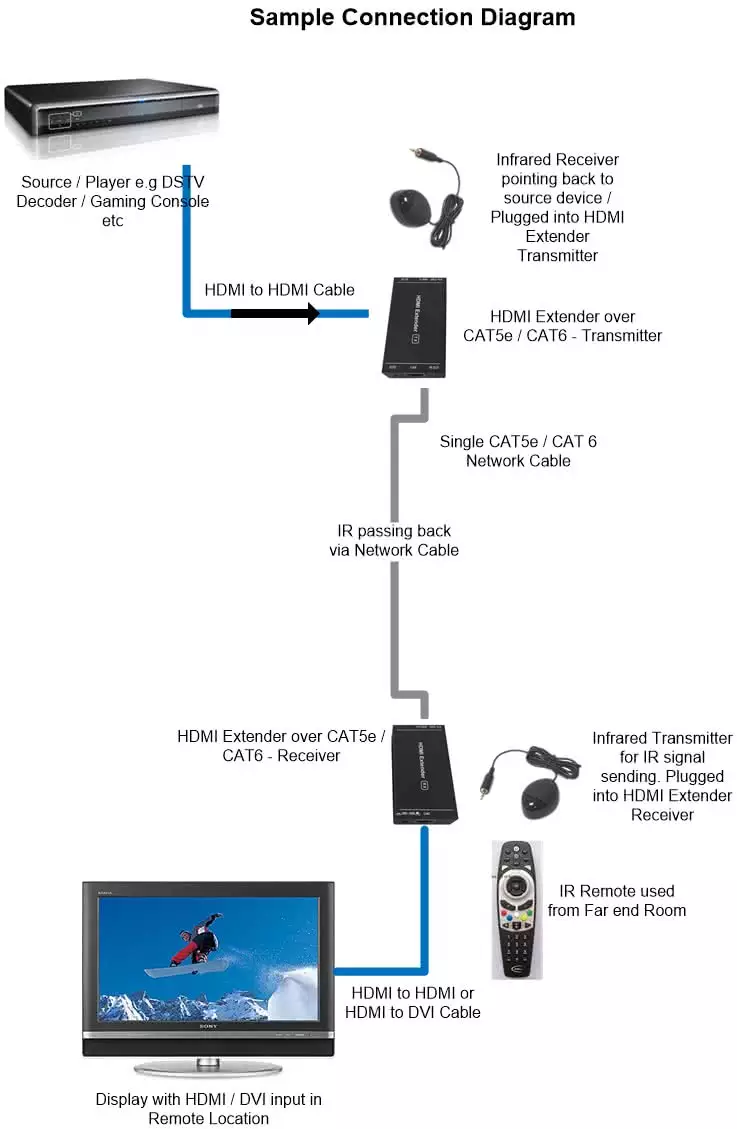
2. Connect the HDMI input sources such as:Multichoice HDPVR, Playstation 3, Xbox 360, HD-DVD, STB etc. into the Sender unit via an HDMI to HDMI cable.
3. Connect two CAT-5e / CAT-6 / CAT-7 cables to both the outputs of the sender unit and the inputs of the receiver unit using IEEE-568B wiring standard for the CAT cabling.
4. Connect the HDMI output display device such as LCD, Plasma or projector to the receiver unit via a HDMI to HDMI Cable.
5. Plug in the 5v, 2A power into the receiver unit.
A technical guide on how to choose HDMI Cables & Equipment is available at Choosing the Correct HDMI Cables and HD Distribution Equipment. If you are not sure which items to purchase please send us an e-mail with requirements using the Contact form on the left under the Information section and we will select the correct products for you based on your requirements. This item conforms to the HDMI v1.3 specifications described in the section. In general for Blu-ray HDMI v1.0 is required as a minimum and for PS3 / Xbox 360 HDMI v1.2 is recommended as a minimum. HDMI v1.3 exceeds both HDMI v1.0 and v1.2 specifications.
This HDMI Extender extends your HDTV display up to 60 Meters (1080P) away from your HDTV source using two CAT6/CAT7 STP cables. Includes both Transmitter and Receiver units. It includes Status indication on the receiver unit to show when a HDMI signal & Power is received from the source. These Extenders can be cascaded to reach unlimited transmission lengths e.g to double the maximum length specification of the extender connect another HDMI Extender set.
If you need to extend your HDMI signal for less than 20 meters and the cable does not run through conduit (which has limited space for the HDMI connector on a standard cable) we recommend that you use an HDMI Equalizer / Repeater
The network cabling used to extend your HDMI signal using these extenders can be found at
CAT6 Unshielded Twisted Pair (UTP) 550Mhz ISA/IEC 11801 Cable or
CAT5e Shielded Twisted Pair (STP) 350Mhz ISA/IEC 11801 Cable
Unshielded Twisted Pair is only recommended up to 20-25 meters and for installations > 25 meters Shielded Twisted Pair cabling is recommend to prevent signal drops. CAT7 / Category 7 Cables (All pairs shielded) are recommended for high bandwidth 1080p (1920 x 1080), 8-Channel Audio, DTS-HD / TrueHD installations and longer transmission distances.
Most HDMI Sources / Players / Gaming Consoles use an encryption algorithm called HDCP which can cause signal issues. To troubleshoot audio / video issues (HDMI Handshake problems) regarding HDMI distribution see the problems and solutions guide at http://www.hdcabling.co.za/hdcp_hdmi_handshake_troubleshooting_guidelines.php
Please check the Home Entertainment Wiring Diagram section on our website for common uses of this switch and for alternative wiring options.
Notice
1. In order to achieve the high transmission quality ,please choose the shielded CAT-5e or CAT-6 cable
2. These extenders have been tested up to 25 Meters on 1080p with 100% quality and no signal problems with Unshielded Twisted Pair (UTP) CAT6 cables with no electrical interference near the cables.
3. The cables with lower quality will not achieve the perfect transmission effect and long distances required.
4. If the product cannot transmit long distances, there are quality problems in the transmission / CAT5e / CAT6 cables used.
Use high quality Surge Protection plugs on your equipment to ensure unstable power from electrical wall socket / electrical surges will have less chance of damaging your equipment. a UPS (Uninterruptible power supply) is highly recommended in all areas of your home or business where LCD's, players and HDMI Equipment is installed.
No HDMI / CAT-5e / CAT-6 / CAT-7 cables are included with this product and must be purchased separately. This product is supplied without packaging / boxing directly from factory to reduce reselling costs to the public. You will not find another HDMI product of this quality at a better price.
Related Keywords : hdmi extension, hdmi extension cable, hdmi cat5 extender, hdmi over network cable, hdmi extend, longer hdmi lengths, increase hdmi length, HDMI Balun
Other products on the web related to this item. Please use the < > buttons below to browse through all the available listings
|